
Revision depth
- Starting out
- Change an idea after testing.
- Going further
- Explain what evidence caused the revision and how the revised explanation differs from the original.
World 01 · Any term · Combined Year 7–8 class
How do systems sense, decide, act and respond?
Your mission
Robot Engineers: make a robot do a useful job, and prove it with evidence.
What you'll make
A flood-supply robot that carries a load across rough or slippery ground, tested and improved with evidence, and a story of how you built it for the community.
Who it's for
People who plan for floods, other classes and your whānau
How long
About nine one-hour sessions, in any term. It can be shorter or longer.
NZ curriculum, Years 7–8:Science: Motion and ForcesScience: Matter Interactions and EnergyTechnology: Systems and ControlTechnology: Digital TechnologyTechnology: Design, Make, and Innovate· Topics: robotics, EV3 robots, sensors, systems thinking, forces and motion, speed, gears, programming, algorithms
Your journey
Tap a week to see that lesson. Each world runs as nine one-hour weeks; it can be shortened to five weeks or stretched to 11–12.
Week 1Open →
Meet the flood-supply robot challenge
Knowledge and context
Knowledge and context
Week 2Open →
Systems, energy and motion; our question
Ask
VOICE Question
Week 3Open →
Investigate wheel size, gearing, friction and load
Look closely · Collect evidence · Compare
VOICE Observe · Evidence · Compare
Week 4Open →
Make sense of the evidence
Make sense of it · How sure are we? · Say what we found · Decide what's next
VOICE Interpret · Uncertainty · Finding · Next step
Week 5Open →
Design brief and options
Define the problem · Come up with ideas · Sketch the plan
FORGE Frame · Options · Represent
Week 6Open →
Build and programme a first prototype
Build it
FORGE Generate
Week 7Open →
Test against the criteria
Test it · Judge it
FORGE Test · Evaluate
Week 8Open →
Refine and retest
Improve it
FORGE Refine
Week 9Open →
Explain and share
Explain and share
FORGE Explain
5 weeks
Quick build
Robot upgrade card: test one change (wheel size or gearing) on a ready-built robot and share the upgrade.
9 weeks
Full journey
Design, build, test and improve your own flood-supply robot, then share it.
11–12 weeks
Go further
A second design cycle with double the load, a sensor mission, or a protocol for the NuiBot community.
Big ideas
Systems consist of interacting components that work together for a purpose.
Sensors provide information that can be used to alter system behaviour.
Feedback can stabilise or change system behaviour.
Forces determine how and whether an object's motion changes.
Design involves trade-offs between competing requirements.
Up close
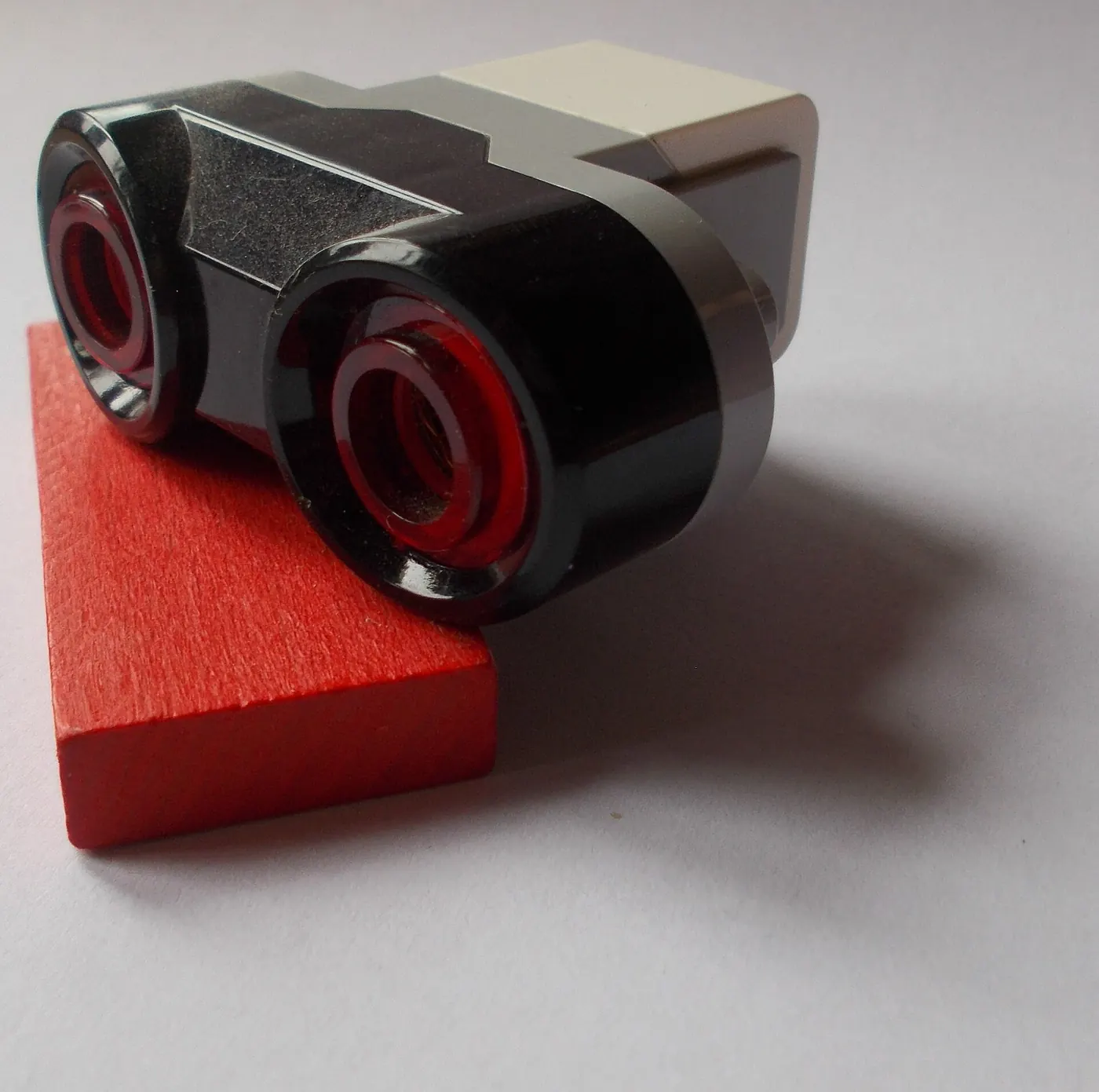
The EV3 ultrasonic sensor: two 'eyes' that measure distance with sound.
Photo: Jim McTurbo, CC BY-SA 4.0, via Wikimedia Commons
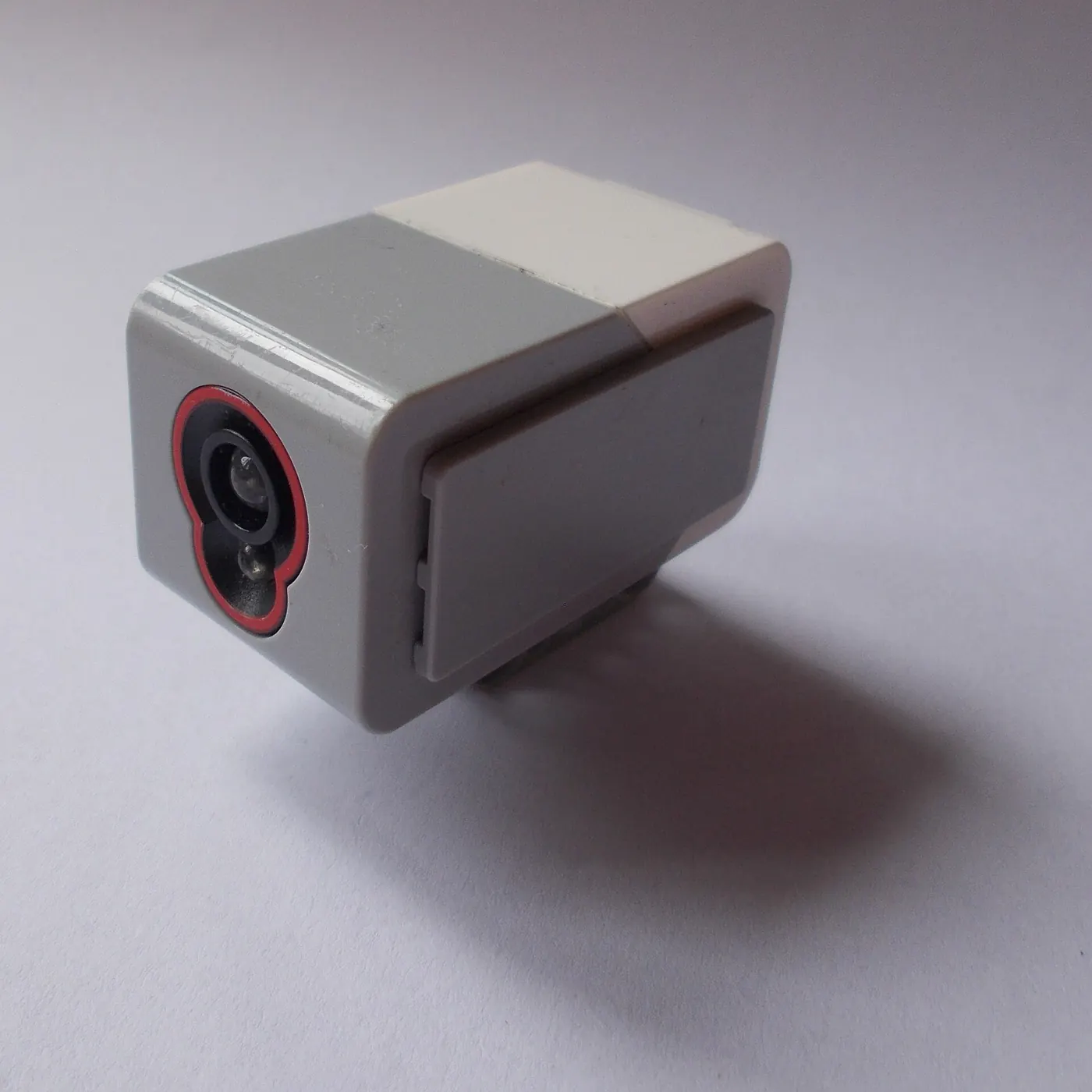
The EV3 colour sensor reads colour and light, which is how a robot follows a line.
Photo: Jim McTurbo, CC BY-SA 4.0, via Wikimedia Commons
Read first
A robot is not a toy here. It is a tool that helps you do science. Robots can take the same reading again and again, reach awkward spots, and keep working overnight while you sleep.
The robot does not do your thinking. You decide what to measure, what makes a test fair, and what the evidence shows.
Here are some jobs robots do for scientists:
| What the robot does | The science job |
|---|---|
| Reads pH every 30 minutes overnight | Catches changes you would miss at 3 pm |
| Returns its arm to the same spot ten times | Tests repeatability: does it hit the same place? |
| Follows a line and pauses at markers | Samples several points fairly |
| Beeps and logs if the temperature goes above a set number | Warns you about an unexpected change |
Think about it: For our flood-supply robot, which of these jobs would matter most? Why?
Source: Kōkiri Lab student guide "Robots as helpers" (2020 Courses Content / Kokiri Lab Site Build / Student_Guides).
Every robot, and every system, follows the same pattern:
You can learn this pattern even without a robot. Free online simulators let you program a virtual robot in your browser: Open Roberta Lab (it can pretend to be an EV3), VEXcode VR and Tinkercad Circuits. Later you can run the same logic on a real robot.
Think about it: Write the input, process and output for "stop when something is half a metre away".
Source: "SPIKE ideas" planning notes (Kokiri lab / 2025 / Robot / SPIKE).
Big robots are built from subsystems: one part moves the robot, one part sees, one part grabs, one part talks to people. A good design lets you watch and change each subsystem on its own, then see how it changes the whole robot. Good designs also plan for safety: a clear "keep-out" space around a moving arm, and an emergency stop.
Even a simple EV3 robot has subsystems: the drive (motors and wheels), the sensors, the program, and the power (battery).
Think about it: Name the subsystems on your robot. If the battery is low, which other subsystems are affected?
Source: "Science Robot v3" design notes (Kokiri lab / 2025 / Robot / old).
Some classes have used EV3 robots to tackle a real local issue. Students chose a problem in their community, checked that their information came from sources they could trust, built and tested a prototype, and pitched their idea to real people. The robot was not the whole answer; it showed how technology could help.
That is what our flood-supply challenge asks too: a real need, trustworthy evidence, a tested robot, and a clear explanation for an audience.
Think about it: Who in Whanganui would want to hear about a flood-supply robot? What evidence would they want to see?
Source: "Leadership for Change: Community Innovation with LEGO EV3", a 4-week WIS unit (WIS / old / Term 4).
A protocol is a numbered recipe for what your robot does. A good one names the behaviour clearly ("Line follow with obstacle pause", not "cool robot v3") and says:
Say how many trials you ran (ten is a common school standard). Include safety notes, especially about water, pinch points and batteries. Never share passwords, anyone's full name, or tricks that switch off safety features.
Think about it: Could another group rebuild your test from your steps alone? What would they get stuck on?
Source: Kōkiri Lab student guide "Share your steps" (Student_Guides).
Go deeper: from Science Learning Hub and DOC
Robots are already doing real jobs in Aotearoa. On kiwifruit and apple orchards they solve problems that people find hard, slow or expensive.
| Robot | The job | How it senses or acts |
|---|---|---|
| QuadDuster | Spreads pollen on kiwifruit flowers | A quad bike with electronic control and GPS tracking, dispensing dry pollen |
| Apple packing cell | Packs about 120 apples a minute, stems and colours all facing the right way | Cameras and vision software work out each apple's position; suction cups pick it up |
| Kiwifruit harvester | Picks the fruit | Part of a research project by universities and Plant & Food Research |
Why build them? If kiwifruit flowers aren't pollinated well, the fruit grows small or misshapen and can't be exported. Orchards also struggle to find enough seasonal workers, and packing by hand can be inconsistent.
These robots are mechatronics: electronics, programming and mechanical engineering working together. Every one of them follows the same pattern you are using: sense → decide → act.
Think about it: Pick one orchard robot. What is its input, its process and its output? What could go wrong, and how would the engineers test for it?
Adapted for Kōkiri Lab from “Robots for horticulture”. Source: Science Learning Hub – Pokapū Akoranga Pūtaiao, The University of Waikato Te Whare Wānanga o Waikato, www.sciencelearn.org.nz Read the original
Explore more
These links open other websites. Kōkiri Lab checked them in September 2026.
How you'll learn
What evidence can we gather?
Students encounter the phenomenon, build the knowledge needed to interpret it, and gather evidence directly.
This is not a strict pipeline. A student may investigate, model, test, investigate again, revise, and communicate, in whatever order the actual inquiry demands.
Make something
Science investigations
VOICE: ask a question and find out with evidence
You need
EV3 robot · two wheel sizes · a measured load (e.g. a bag of rice) · tape measure · stopwatch
Steps
How you'll know: Compare the averages. A difference bigger than the spread between your repeats is worth trusting.
Go further: Try the same test on a slippery surface. Does the winner change?
Fits Week 3 →You need
EV3 robot with swappable gears · ramp (a board on books) · load · stopwatch
Steps
How you'll know: You should see a trade-off: gears that make it faster often make it weaker. Say which suits a flood-supply robot, and why.
Go further: Draw the forces on the robot on the ramp.
Fits Week 3 →You need
EV3 with colour or ultrasonic sensor · black tape on a light floor · tally sheet
Steps
How you'll know: A reliable sensor stops in time on almost every trial. The tally shows which setting to use.
Go further: Test under bright light and dim light. Does the sensor still work?
Fits Week 6 →Build projects
FORGE: design, make, test and improve
You need
EV3 kit · load · rough test course
Steps
How you'll know: It meets the criteria you wrote in step 1, and you can show the test results.
Go further: Double the load. What has to change?
Fits Week 6 →You need
board or laser-cut ramp · books or blocks · protractor
Steps
How you'll know: Repeated runs give similar results, so other groups can use your ramp for fair tests.
Go further: Add a second, steeper setting.
Fits Week 5 →You need
touch or ultrasonic sensor · Technic parts
Steps
How you'll know: It reacts correctly on nearly every trial, and you can explain input → process → output.
Go further: Make it slow down gradually instead of stopping suddenly.
Fits Week 8 →More ideas from the Kōkiri library
Background learning
Earlier Kōkiri inquiries with learn pages, activities and build ideas that fit this world. They were written before the eight-world curriculum, so use them as background and pick what helps.
Makerspace build ideas
Ready-made ideas from the Kōkiri maker library that suit the Make & Test part of this world.
Stretch challenges
Where AI helps
Kōkako, your AI mentor
Weeks 2–4, while you investigate
NuiBot code helper
Week 6, when you build and program
Our AI promise
Your platform
Build, code and test robots, from intent to a working robot.
Build guides, the Function Library and the Code page are here now. Ask NuiBot is shown but not switched on yet. Community protocol sharing stays open.
Open NuiBotTaught to the whole combined class. Over the two-year programme the class covers both the Year 7 and Year 8 curriculum statements.
The whole combined Year 7–8 class investigates the same phenomenon, with the same fieldwork, equipment and inquiry problem. Instead of splitting the class by year level, every task has three levels of support (Getting started, On track, Stretch), so each learner goes as deep as they are ready to.
The direct predict-test-retest cycle of building and programming makes revision especially visible and frequent.
All five dimensions recur across every world. Each world provides a context in which one or more becomes especially visible, not an exclusive assignment.
Document 33 stage names, used across Kōkiri. The week plan above shows which stages each week works in.
Te reo groupings shown are provisional, pending cultural advisor review.
Mainly in STEM Investigate and Think & Create.
Kite · te reo group (provisional)
Whakaaro · te reo group (provisional)
Mainly in Make & Test, ending with Explain in Share & Impact.
Wero · te reo group (provisional)
Kite · te reo group (provisional)
Whakaaro · te reo group (provisional)
Auaha · te reo group (provisional)
Tohu · te reo group (provisional)
Railways, telegraph, hydroelectricity and the history of engineering and automation in New Zealand; local engineering and infrastructure history where accessible.