
Kōkiri Lab · Share & impact · Community science
Share & impact · 04 · Tell · Community science · Robotics
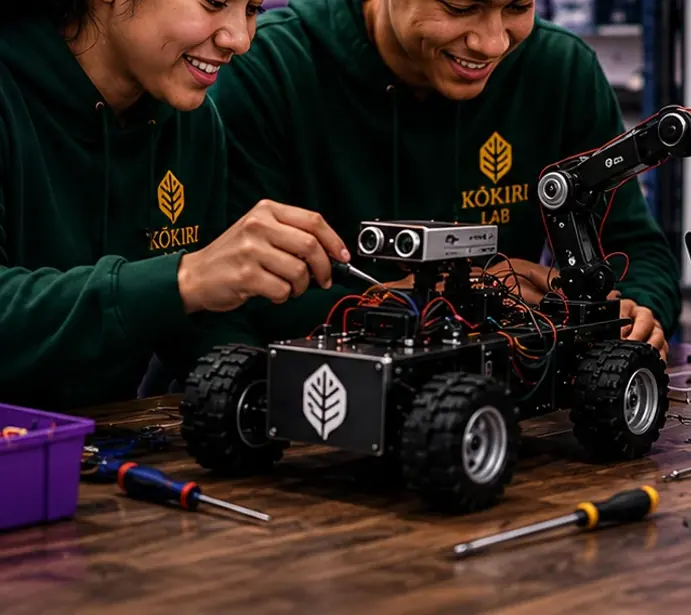
Robots as research partners
Share behaviour protocols, calibration tips, and what you learned running a science assistant robot — a growing library for schools and makers.
Open: Protocol steps, what worked, and honest calibration notes. · School: Robotics & Systems inquiry world
Part of the Robotics & Systems inquiry world
From intent to a working robot
One way to go from “I want the robot to do this” to a working, tested robot. It works the same way with this term’s LEGO EV3 builds as it will with a future NuiBot. Only the answer to “what’s available?” changes.
 Start the Robotics StudioPick a mission, build a robot, and turn your ideas into real code, step by step.
More ways to work on your robot
- BuildBase robots you'll extend for your own function: Droid Bot 2.0 and Enterprise.View build guides
- CodeWrite MicroPython for your EV3, then download it and load it onto the brick.Open the code editor
- Function LibraryWhat does your robot need to sense, and what should it do? See what the EV3 kit can do now.Find a function
- Coming soonAsk NuiBotTell NuiBot what you want your robot to do. It gives you a labelled first draft. Testing it is your job.See how it works
Go deeper: the FORGE design process behind this
Te reo groupings shown are provisional, pending cultural advisor review.
Wero · te reo group (provisional)
1Frame
What do you want the robot to do, and how will you know it worked?
What is the task? What must be true for it to count as success? What constraints do you have (space, time, materials)?
Kite · te reo group (provisional)
2Options
What are the different ways you could make it do that?
What sensing does this need? What action does this need? Use the Function Library to find at least two real approaches and compare them before picking one.
Whakaaro · te reo group (provisional)
3Represent
What will your chosen approach look like before you build it?
Sketch the mechanism, draw a flowchart of the program, or make a quick model. Label the sensor, the action and the decision point.
Auaha · te reo group (provisional)
4Generate
Build it and programme it.
Construct the physical mechanism. Describe the behaviour to NuiBot's AI layer in your own words, then read, run and explain the first-version code.
Tohu · te reo group (provisional)
- 5
Test
Run it against what you said success would look like in Frame.
Run it the same way more than once. Record what actually happened, not what you expected to happen.
- 6
Evaluate
How well did it work, and why?
Compare the results with your Frame criteria. Say what worked, what did not, and what probably caused it.
- 7
Refine
Change it, and say why.
What did the test show? What are you changing? Why should the new version work better? Retest.
- 8
Explain
Can someone else understand what your robot does and why?
Explain what the robot noticed and why it acted, what you changed and why, and what you would try next.
For teachers: where FORGE sits in the eight-lesson Robotics unit (Lessons 4–8)
Te reo groupings shown are provisional, pending cultural advisor review.
| Lesson | Unit focus | FORGE stage | What this produces |
|---|---|---|---|
| 4 | Motor | Frame + GenerateWero · Auaha · te reo group (provisional) | Criteria carried over from Lesson 1's marked motor space; motor mounted, tested, and compared with the elastic car |
| 5 | Sensors | Options + TestKite · Tohu · te reo group (provisional) | Sensor options compared by testing across surfaces, one mounted and checked |
| 6 | Code | Represent + GenerateWhakaaro · Auaha · te reo group (provisional) | An if-then rule predicted, built and explained before running; first-version code run and recorded against the prediction |
| 7 | Terrain course | Test + Evaluate + RefineTohu · te reo group (provisional) | Three terrain-course tests with one change each, results recorded, and a revised claim with the earlier version kept visible |
| 8 | Share | ExplainTohu · te reo group (provisional) | Robot, evidence and design journey explained to the class; final reflection in Kōkiri Lab |
Why your contribution matters
A good robot 'recipe' (a protocol) lets any class repeat a science task fairly. Sharing yours builds a library that schools across Aotearoa can use, improve and trust.
- Your class, to make your robot tests repeatable (Robotics & Systems).
- Other schools with EV3 kits, who can reuse and improve your protocols.
- Teachers planning robotics lessons for the first time.
Community missions
Pick a mission for your class, your family or a group of schools.
Ten-trial challenge
Can your robot do the same job 10 times in a row? Prove it.
- Pick one behaviour (stop at a line, carry a load).
- Run it 10 times and record every result.
- Share the protocol and your success rate.
Protocol swap
Can another school's class follow your steps and get the same result?
- Write your protocol with numbered steps.
- Swap with another class.
- Fix whatever they got stuck on.
Flood-supply design day
Whose robot carries the most supplies across the course, and why?
- Agree the course and load with other classes.
- Test on the day and record results.
- Share the design idea that made the biggest difference.
For teachers and schools: work together
- Protocol partners: two schools test each other's protocols and send back one improvement.
- Share build tips in the NuiBot community library, with photos of robots, not people.
- Teachers: join the Kōkiri STEM Teacher Community to co-plan robotics weeks with other schools.
Take it further: bigger NZ projects
- Robot sensors
Science Learning Hub video on how robots sense the world.
- Science Learning Hub: citizen science
Many more NZ projects your class can join, with teacher guides.
Share observations, not people: no names, no faces, no home addresses. A place nickname and region are enough.
How it works
Code → Calibrate → Run → Share
Code behaviour
Name what the robot does for a science question — not just a cool demo.
Calibrate
Home position, sensor zero, timing — write it down.
Run trials
Say how many repeats — ten is a common school standard.
Share protocol
Numbered steps another team could follow safely.
Show, don't just tell
Example protocol
- Behaviour
- Overnight temperature log
- Trials
- 18 automated reads
- Safety
- Adult checks battery near water
Numbered steps another team could follow. Purpose states the science question first.
Borrowed from MaramaTrap's example-photo pattern — works for every platform.
Robotics learning pathway
From first sensor read to overnight sampling — document so another team can repeat your method.
Environmental sensing
Overnight pH logs, repeatable arm placement, line-follow sampling.
Automation ethics
Robots extend your reach — you still interpret and take responsibility.
Hardware honesty
Say LEGO, Arduino, or Pi so others can adapt your protocol.
Good to know
Robot as helper
It can sample at 3 am or hit the same spot ten times — you interpret the data.
School vs community
Share the recipe openly here. Keep class trial data in your investigation.
Where NuiBot fits in the curriculum
From intent to a working robot. Students move from “I want the robot to do this” to a working, tested robot through the FORGE design cycle.
Build guides, the Function Library and the Code page are here now. Ask NuiBot is shown but not switched on yet. Community protocol sharing stays open.
Platforms are developed in response to curriculum and inquiry requirements, not the reverse.
Also try community science
The same fair-testing habits work across platforms — honest notes, repeat visits, no street addresses.
MaramaTrap
Community moth monitoring for Aotearoa
Explore →AwaKai
Aquaponics water logs for growing food
Explore →SkyLab
Flight school & biomimicry logs
Explore →KāingaLab
Model-home fair tests for Ecohome & Design
Explore →AraQuest
Build a world, test how it behaves
Explore →